Writing
Automating Knowledge Graphs because your content needs context
May 20, 2026
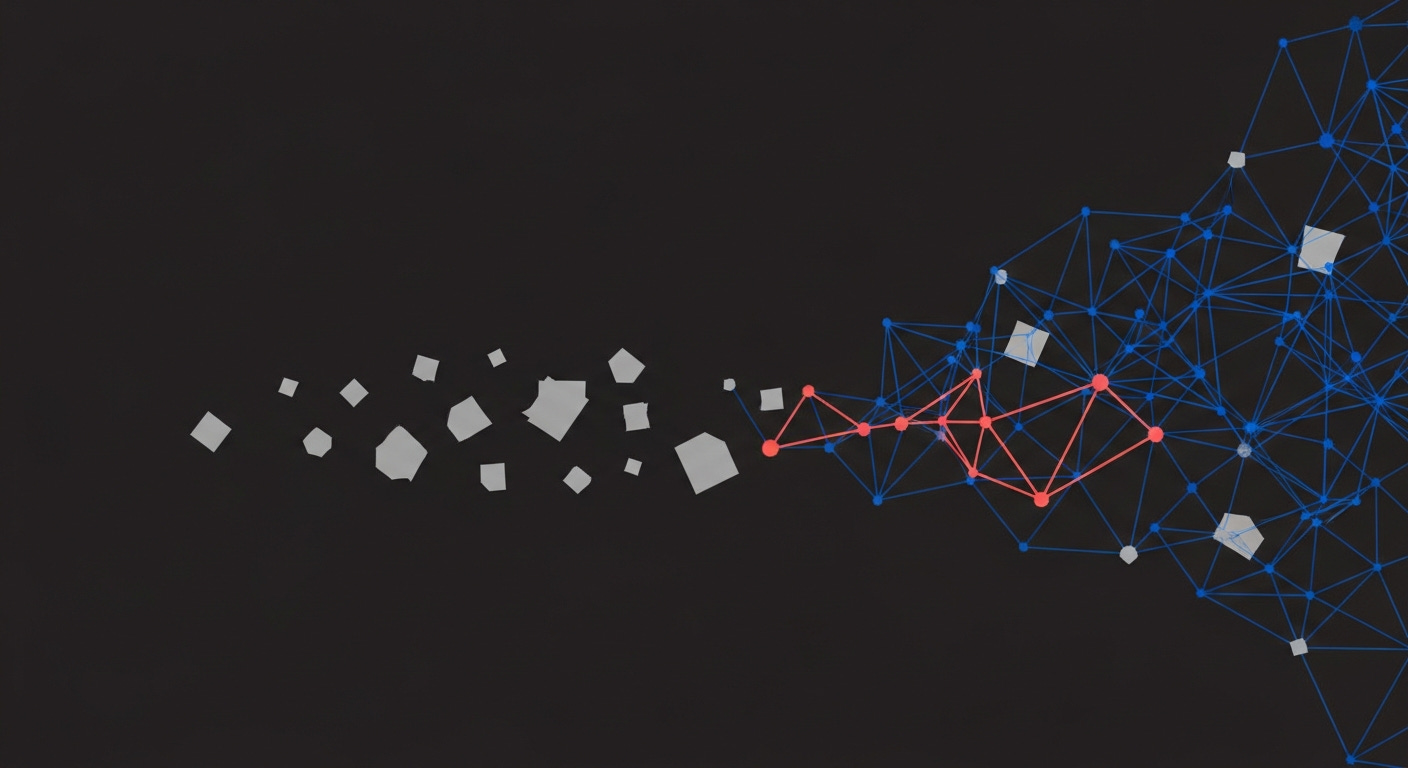
Consider you’ve built a large AI agent that reads your meeting notes, project briefs, email summaries, research digests — months of information accumulating in a single directory. Somewhere in those files, a person mentioned in a Tuesday meeting is connected to a company that appeared in a client’s project brief last quarter. All the information is there, but no one has connected the information.
This is the problem with documents. They store what you know, but not how things relate. The connection is right there in the text — but your files don’t know about relationships. They know about files. And search only helps when you remember the exact words someone used three months ago.
What if you could ask your documents a different kind of question — not “which file mentions this person?” but “who is connected to this project, and through what?”
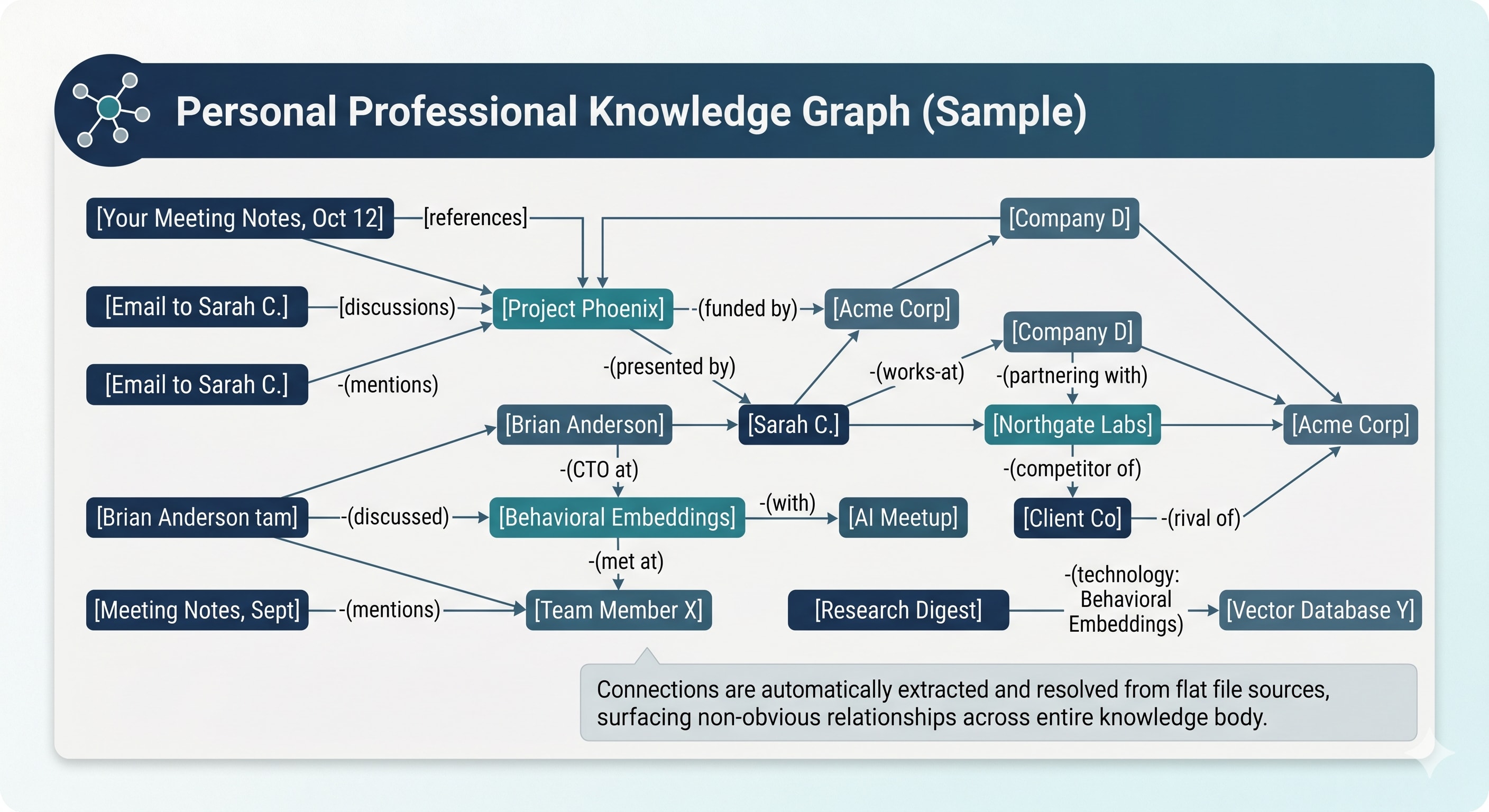
That’s what a knowledge graph does. And until recently, building one was clunky, you would have to build the connections manually and the software wasn’t intuitive. It worked fine but it kept knowledge graphs to an esoteric few use cases. So what if we threw AI at generating the knowledge graph.
Three Ways to Store What You Know
To understand what a knowledge graph is, it helps to compare it to the two things you probably already use.
Let’s say your company is evaluating a partnership with Acme Corp. You know you’ve seen the name before — meeting notes, email threads, a project brief. You want the full picture: who’s involved, what the connections are, whether there’s history you’re forgetting. Here’s how three different approaches handle that question.
The Spreadsheet
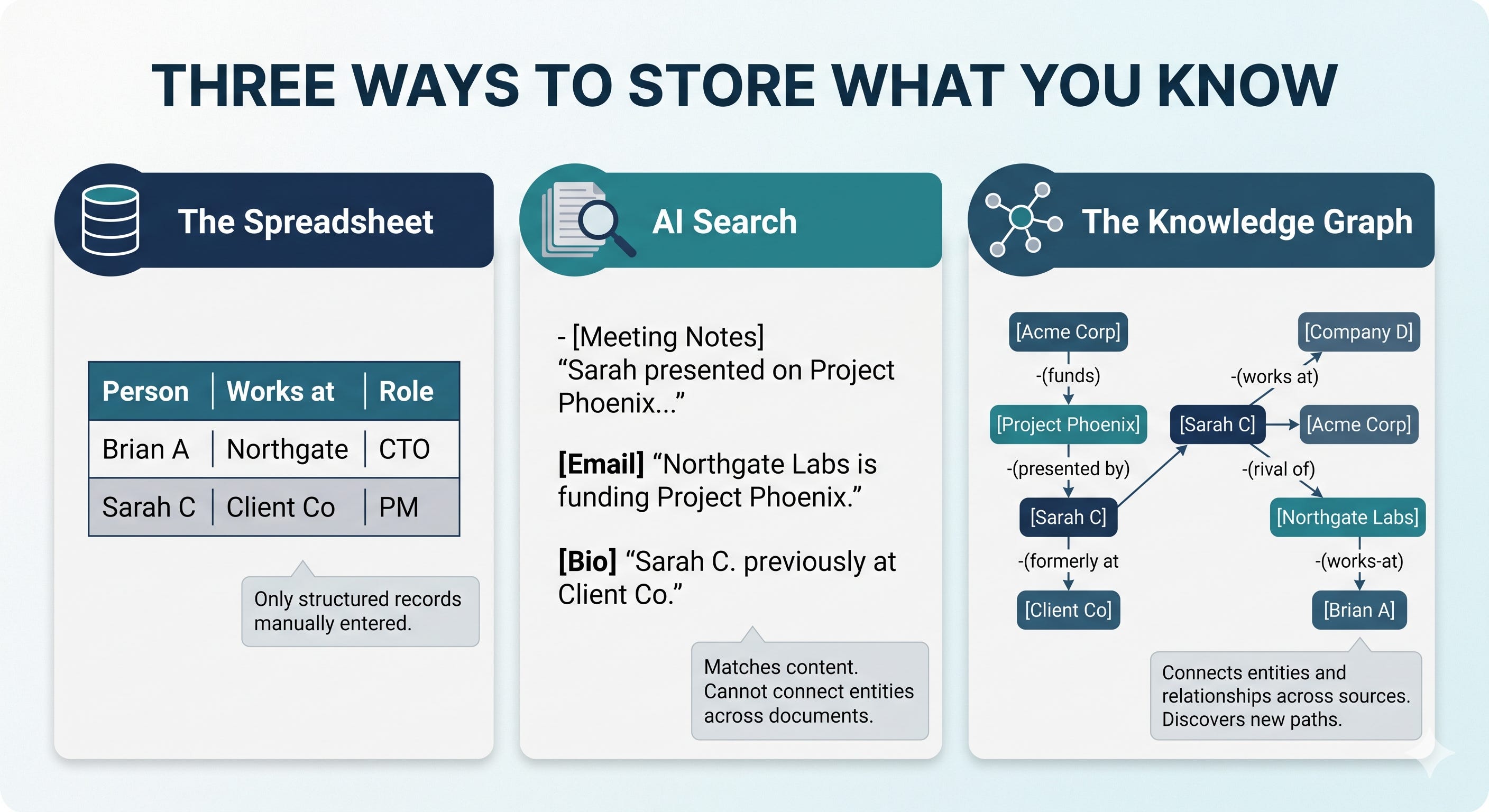
You open your CRM, your project tracker, your contacts database. You search for “Acme Corp.” If someone manually entered the relationship — a row in a table, a field in a record — you find it. If they didn’t, it doesn’t exist.
This is how traditional databases work. They’re excellent at storing structured records and answering precise questions: “What’s the deal size? When’s the renewal date?” But the data has to be structured before it goes in. Someone has to decide what columns matter, then fill them in. The connections between things only exist if a person explicitly created them. Structured data is notoriously bad at modelling the real world, because reality is much more unstructured.
For a single system — a CRM, a project tracker — this works. But your knowledge doesn’t live in a single system. It lives across meeting notes, emails, documents, and conversations. Nobody is entering those connections into a spreadsheet.
AI Search (or RAG)
This is what happens when you upload documents to ChatGPT, use NotebookLM, or any tool that lets you “ask questions about your files.” You upload everything and ask: “What do we know about Acme Corp?”
The tool scans your documents and finds paragraphs that mention Acme Corp or use similar language. It’s good at surfacing relevant passages. If a meeting note mentions Acme Corp by name, AI search will find it. It will find two documents if they are “contextually” similar. That in itself, is fantastic. You can find companies in an industry, meetings where you talked about the same things, similar documents.
But here’s the limitation. Say Sarah from your team presented on Project Phoenix at an internal meeting — that’s in one document. And Acme Corp is funding Project Phoenix — that’s in a separate email from last quarter. Sarah’s name never appears alongside Acme Corp anywhere. AI search won’t connect them. It matches content, not relationships. It finds documents where terms co-occur. It can’t walk a path through entities that span multiple documents.
For single-document questions — “what did the Q1 report say about revenue?” — AI search is the right tool. Fast, accurate, good enough.
The Knowledge Graph
A knowledge graph stores the things and the relationships between them.
It knows Acme Corp is funding Project Phoenix (from the email). It knows Sarah presented on Project Phoenix (from the meeting note). It knows Sarah previously worked at your client’s firm (from a different meeting note entirely). Ask “how is Acme Corp connected to our client?” and the graph walks the path: Acme Corp → funds → Project Phoenix → presented by → Sarah → formerly at → your client’s firm.
That path was never in any single document. No search query would find it. No spreadsheet captured it. But the knowledge graph extracted each relationship from prose, resolved the entities, and connected them. The connection was always in your files. It just wasn’t queryable until now.
Here’s the comparison in plain terms:
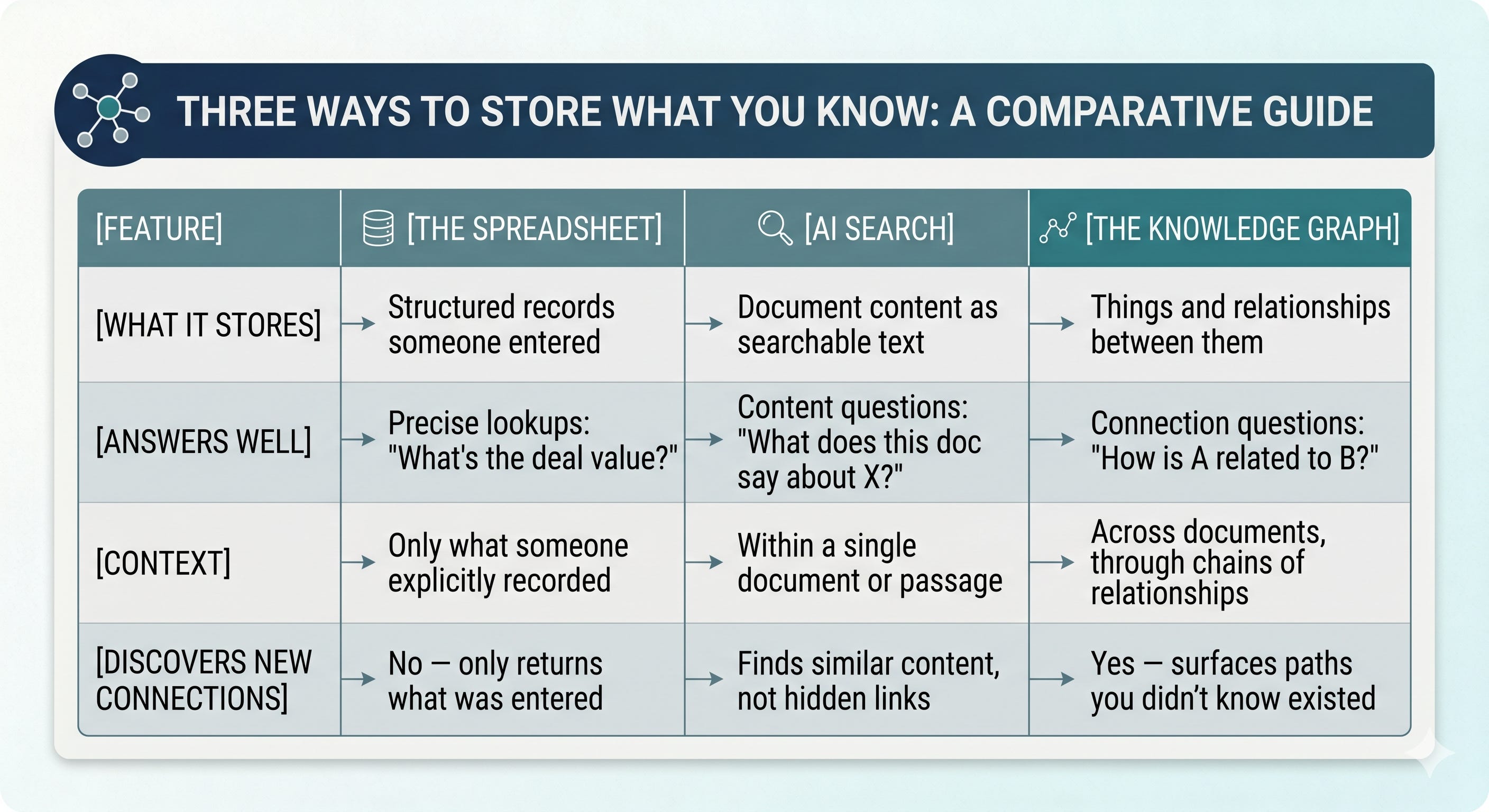
None of these replaces the others. The spreadsheet is still the right tool for structured data. AI search is still the right tool for finding what a specific document says. The knowledge graph fills the gap between them — the questions about how things connect across your entire body of knowledge.
Why This Is Possible Now
In the past creating knowledge graph from regular documents required custom software and a team of engineers, painful at best. Three things changed.
AI can now read prose and extract entities and relationships automatically — a peer-reviewed paper in Nature this year documented the maturity of this technique.
The cost of AI processing dropped 12x in three years, making it a rounding error instead of a budget conversation.
And everything runs locally in a single file on your machine — no cloud databases, no IT department, no infrastructure.
Connection Intelligence
Here’s the concept that made this click for me.
I’ve been building a knowledge worker automation framework for months — a system where documents are the universal data format. Emails arrive as markdown files. Meeting notes become markdown files. RSS feeds, project docs, research memos — all documents in a directory. It works well for storage and retrieval. (https://github.com/tobi/qmd works great for that!)
But flat files have a ceiling. Every document is an island. The connections between them live only in my head — or buried in prose where I’ll never find them again.
A knowledge graph removes that ceiling. When you extract entities and relationships across your entire collection of documents, patterns emerge that no amount of reading would surface on its own. A person mentioned in a meeting note three months ago turns out to be connected to a company in this week’s research digest. A technology discussed in a project brief shows up in a paper you skimmed in January. A client’s competitor just hired someone from your extended network.
These connections compound. Each new document you add doesn’t just add content — it adds edges to existing nodes, creating new paths through your knowledge. The graph gets denser as it grows. The hundredth document doesn’t contribute 1% more intelligence. It contributes the hundredth document’s relationships to everything that already exists — multiplying the number of discoverable connections.
This is what I mean by connection intelligence. The value isn’t in any individual document. It’s in the web of relationships between documents — relationships that were always there, always in the text, but never queryable until you extracted them.
How It Works (Just the basics)
Building a knowledge graph from documents happens in three stages. You don’t need to understand the mechanics to use one, but understanding the stages helps you trust (and question) the output.
Stage 1: Extract
The AI reads each document and identifies the things and relationships in it.
From a sentence like “Brian Anderson from Northgate Labs presented at the AI Tinkerers meetup about behavioral embeddings,” it extracts:
Things: Brian Anderson (a person), Northgate Labs (a company), AI Tinkerers (an event)
Relationships: Brian Anderson works at Northgate Labs. Brian Anderson presented at AI Tinkerers.
This happens automatically across every document. You don’t tag anything. You don’t create links. The AI reads the prose and finds the structure hiding in it.
Stage 2: Resolve
This is the hard part — and the part that makes a knowledge graph actually useful.
“Brian Anderson” in one document. “B. Anderson” in another. “Northgate’s CTO” in a third. Same person? The system clusters similar names, checks the context, and merges them when the evidence is strong enough.
Is it perfect? No. Entity resolution in the best benchmarks achieves around 85-92% accuracy. For a personal collection of documents with consistent writing patterns — you tend to refer to people and projects the same way — it’s better than that. And imperfect matching is still dramatically better than no matching. “Brian Anderson” and “B. Anderson” getting merged, even if “the CTO” doesn’t, already collapses a fragmented graph into something navigable.
Stage 3: Discover the Structure
This is the part that surprised me. You don’t have to tell the system what categories to look for. After processing your documents, it analyzes what it found and produces its own structure — these are the types of things in your world (people, companies, projects, technologies) and these are the types of relationships between them (works-at, funded-by, depends-on).
After processing my workspace, it discovered six entity types and fourteen relationship types. The structure emerged from the data, not from my imagination. Which means it reflects what’s actually in my documents, not what I thought would be there. Those are almost never the same thing.
Building One from Your Documents
Here’s where the story has changed from even a few months ago.
I originally built kgmd as a command-line tool. It works, and for technical users who live in the terminal, it’s still there.
But most people who would benefit from a knowledge graph don’t live in a terminal. So I built a plugin for Claude Code that does the same thing — inside the AI assistant you’re already using. No separate tools, no API keys to configure. Claude itself does the extraction, and the plugin handles everything else locally.
If you’re using Claude Code, install it in one line:
claude plugin install kgmd from johncarpenter/kgmd-plugin
The server bootstraps automatically on first use. Once installed, you interact with your knowledge graph the same way you’d have a conversation.
To build a graph from your documents: Tell Claude to build a knowledge graph from a folder, or use /build-graph. It reads your documents, extracts entities and relationships, resolves duplicates, and builds the graph. Go get coffee — the first build takes a few minutes depending on how many documents you have.
To explore what it found: Ask naturally. “Who is connected to Project X?” “What do you know about Brian Anderson?” “Show me everything related to Acme Corp.” Or use /search and /explore if you prefer explicit commands.
To trace connections: “How is Person A connected to Company B?” The system doesn’t guess — it walks the actual graph, following typed relationships between resolved entities. That’s a different kind of answer than “I found these documents that mention both names.”
The knowledge graph updates incrementally. When new documents appear, only the new content gets processed. The graph gets richer over time without starting from scratch.
A Claude Desktop extension is in progress — I’ll update the repo when it’s ready.
What This Doesn’t Do
I’d rather be honest about the limitations than have you discover them after investing time.
AI makes mistakes in extraction. Studies show false edge rates around 1.5-2% in automatically constructed graphs. At personal scale — hundreds of documents — this is manageable. The graph is a navigational aid, not a source of truth. When it says “Person A is connected to Company B,” it’s worth checking the source document before acting on it. Your documents remain authoritative. The graph just makes them searchable in a new way.
Some duplicates will slip through. Entity resolution isn’t a solved problem in computer science. Some entities that should merge won’t. Some distinct entities might get incorrectly merged. The question isn’t “is this perfect?” It’s “is this better than what I had before?” The answer is yes, by a wide margin.
Simple questions don’t need a graph. If you’re asking “what did the Q1 report say about revenue?”, regular search gives a better answer. Knowledge graphs win on the questions that connect entities across documents — the multi-hop queries that search structurally cannot answer. “Who knows someone at the company that’s partnering with our client’s competitor?” That’s a graph question. “What was our revenue last quarter?” That’s a search question.
It needs occasional human review. As your collection grows, the structure the system discovered will evolve. Periodic review — does this schema still make sense? Are these merges correct? — is an honest maintenance cost. Not heavy, but not zero.
The summary: better than search, not omniscient. It surfaces connections you’ve forgotten and relationships you haven’t noticed.
Portable Context Memory
Here’s the thing that gets me most excited about this, and it’s not the graph itself.
The biggest limitation of current AI assistants is memory. Start a new conversation and the assistant knows nothing about you. It doesn’t remember the meeting from last Tuesday, the project you’ve been working on for three months, or the person you met at a conference who turns out to be connected to your biggest client. Every conversation starts cold.
Most solutions to this problem lock your memory into a vendor’s cloud. Your conversation history lives on someone else’s server, tied to one product, inaccessible to anything else. Switch tools and your memory doesn’t come with you.
A knowledge graph stored in a single local file is different. It’s portable context memory — your AI assistant’s understanding of your professional world, in a file you own, on your machine.
Move it between devices. Back it up by copying it. Use it with any tool that speaks MCP — today that’s Claude, tomorrow it could be anything. Your knowledge graph isn’t locked to a subscription or a platform. It’s a file. The most portable, durable, unglamorous unit of computing there is.
When your assistant can query this graph, it doesn’t start cold. It knows the web of relationships in your professional life. “You’re meeting with Person A tomorrow. They’re connected to Company B through Project C, which uses the same technology stack you discussed with Client D last month.” That’s not magic. That’s a graph traversal over a memory you own.
Need to switch between Codex and Claude? Just switch the MCP and you should be good to go. This will be the next project.
The Intelligence Was Always There
Your notes contain more intelligence than you can access. Every meeting summary, every project doc, every email digest encodes relationships between people, projects, companies, and concepts. The relationships are right there in the text. They’re just trapped in prose, scattered across files, invisible to anything except your memory — which, if yours is like mine, is unreliable past about two weeks.
A knowledge graph extracts those relationships, resolves the duplicates, discovers the structure, and makes it all queryable. The intelligence was always in your notes. You just couldn’t ask the right questions.
The kgmd plugin works with Claude Code today, with a Claude Desktop extension coming soon. If you prefer the terminal, the CLI is on GitHub too. Try it on your own documents. I’m curious what connections you find that you didn’t know were there.
Originally published on Discontinuity