Writing
Stop Planning Your AI Strategy. Your Team Already Has One.
May 8, 2026

Seventy-eight percent of knowledge workers are bringing their own AI tools to work.
Not tools their company approved. Not tools IT vetted. Personal ChatGPT accounts, Claude subscriptions, Gemini tabs open in a browser nobody checks. Microsoft found this in a survey of 31,000 people. They called it “BYOAI” — bring your own AI.
More than half of those people are reluctant to admit they’re using it.
So while your leadership team debates whether to form an AI committee, your employees have already decided. They’re using AI for drafting, analysis, summarization, and research. They’re doing it on personal accounts with no data governance. And they’re hiding it from you because they’re not sure if it’s allowed.
This is not an adoption problem. It’s a guardrails problem.
Bias Toward Action
I use a framework called “Bias Toward Action” when I consult with product teams. The core principle: decision paralysis is more expensive than imperfect decisions.
Small decisions going to big meetings, consensus-seeking creating delays, clarification loops generating more work than the original decision — these are organizational taxes that compound.
The framework distinguishes between two types of decisions:
Type 1: Reversible. Decide fast. The product team decides. If it’s wrong, you learn and adjust. The cost of delay exceeds the cost of being wrong.
Type 2: Irreversible. Slow down and escalate. Leadership decides. These are the decisions where the blast radius matters — you can’t easily undo them.
AI adoption maps to this perfectly. Most of what your employees are doing with AI — summarizing documents, drafting emails, brainstorming ideas — is Type 1. Completely reversible. If the AI output is bad, they don’t use it. Nothing happened. No data was compromised, no client was affected, no system was changed.
But some AI use is Type 2. Pasting client financials into a free ChatGPT account. Running customer data through an unapproved tool. Automating a workflow that touches production systems. These decisions have consequences that aren’t easily reversed.
Here’s the problem: if you haven’t told your team where the line is between Type 1 and Type 2, they’re drawing it themselves. Your best employees will draw it conservatively. Your least careful employees won’t draw it at all. And you have no visibility into either.
The bias toward action says: the default should be “yes, use it.” Management’s job isn’t to approve every use of AI. It’s to define the boundaries clearly enough that employees can move fast on Type 1 decisions without accidentally making Type 2 ones.
Silence is not caution. Silence is the absence of guardrails.
The Adoption Ladder
If you accept that your team should be using AI — and they already are, so this is less of a philosophical question than it sounds — the next question is what guardrails you need at each level of use.
I think of AI adoption as a four-level ladder. Each level represents more autonomy and more organizational value, but also requires more governance. Your job as a leader is to make Levels 1 and 2 frictionless, put clear boundaries around Level 3, and be deliberate about Level 4.
Level 1: Observe
What employees do: Use AI to explain, summarize, and audit things they already understand.
Summarize a report. Explain a process document. Pull key points from a meeting transcript. They already know the right answers — they’re checking whether the tool gets them right.
Guardrails needed: Almost none. This is pure Type 1 territory. The only governance question is which tool, and the answer should be: provide a paid account so they’re not using free tiers that may train on their conversations. $20/month per person. That’s the entire guardrail.
What you should do: Buy your team accounts. Tell them explicitly: “Use this for summarization, explanation, and analysis of your own work. You don’t need to ask permission.” Then get out of the way.
Level 2: Accelerate
What employees do: Use AI to speed up tasks they already perform — drafting, rephrasing, analyzing, formatting.
The work is still theirs. AI gets them to the 80% draft faster. They spend their time on the 20% that requires judgment.
Guardrails needed: Light. Same as Level 1, plus one rule: don’t paste client or customer-identifying information into individual accounts. Internal work product — your drafts, your summaries, your analysis — is fine on any paid business plan. The major providers (Claude, ChatGPT, Gemini) contractually guarantee that paid-tier data isn’t used for training.
What you should do: Make the boundary explicit. “Use AI to accelerate your own work. Keep client names and customer data out of individual tools. If you’re not sure whether something counts, ask [one named person], and they’ll answer within 24 hours.” That last part matters — a fast answer to a boundary question prevents people from either hesitating or guessing wrong.
Level 3: Build
What employees do: Use AI to create first drafts of new work — analyses, proposals, plans, research summaries.
This is where AI goes from time-saver to capability multiplier. Blank-page paralysis is real, and it costs more time than most leaders realize. AI eliminates it. But the output requires genuine review — AI drafts contain errors that look plausible. A trend described backwards. A recommendation that sounds reasonable but misses context. The kind of mistakes a confident new hire would make.
Guardrails needed: Real ones. This is the Type 1 / Type 2 boundary for most organizations.
Review requirements: AI-generated first drafts that go to clients or external audiences must be reviewed by a human who understands the domain. This isn’t optional.
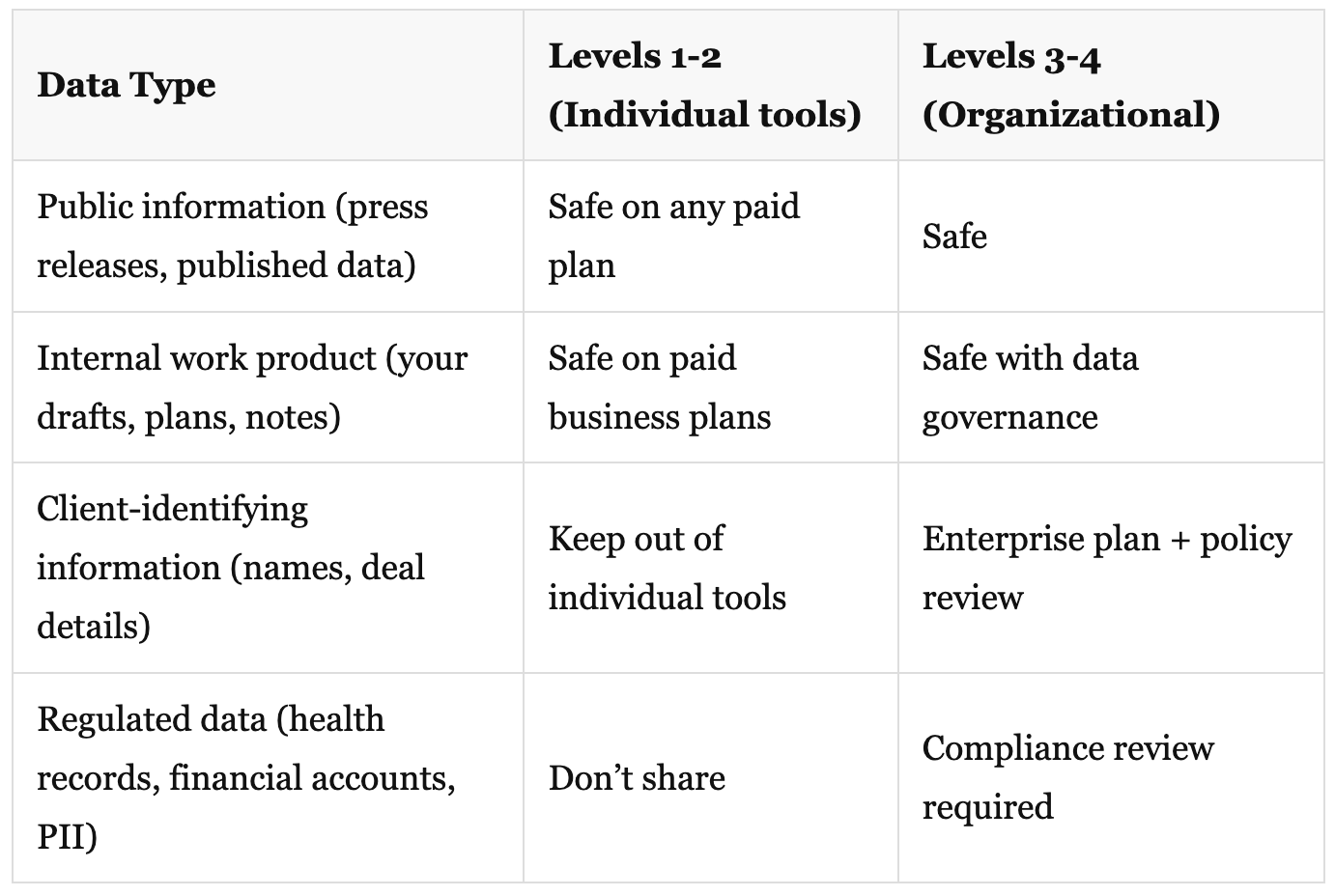
Data classification: Define what data categories can be used with AI tools. Public information, internal drafts, client data, regulated data — each has different rules. (Table below.)
Disclosure norms: Decide whether your organization discloses AI use in deliverables. Some industries require it. Others don’t care. But have a position, don’t leave it to individual judgment.
What you should do: Write a one-page AI use policy. Not a 40-page governance document — one page. What’s allowed, what requires approval, who to ask when you’re not sure. The best employees will follow it. The rest will at least know it exists.
Level 4: Orchestrate
What the organization does: Multi-step AI workflows that connect tools, data sources, and decisions.
Automated report generation from live data. Meeting notes that update project trackers. Research workflows that synthesize multiple sources and flag changes. This is where AI becomes operational infrastructure, not individual productivity.
Guardrails needed: Significant. This is firmly Type 2 territory.
Decision owner: One person owns AI automation decisions. Not a committee. One accountable person who can say yes or no within a defined SLA. (I recommend 3-5 business days for medium decisions, explicitly scoped timelines for large ones.)
Testing and rollback: Automated workflows propagate errors at machine speed. Every automation needs a test plan and a way to roll back.
Cost controls: AI API costs at this level can surprise you. Set spend alerts. Review monthly.
Audit trail: Know what data flows through automated AI workflows, and where it goes.
When to get here: Not until your team has months of track record at Levels 1-3. Not until you have the one-page policy from Level 3. Not until someone on the team can explain what went wrong when an automation breaks.
The Data Question
Most AI security conversations focus on the wrong risk. Leaders ask “will OpenAI train on our data?” The real risk is simpler and more immediate: your employees are pasting sensitive information into whatever tool they find helpful, and you have no visibility into where that data goes.
The foundation model training question is largely solved. Every major provider offers business tiers where your data stays out of training. Contractually guaranteed. That’s a procurement checkbox, not a strategic concern.
—
Here’s the nuance most people miss: there’s a difference between a foundation model provider and the hundreds of AI tools built on top of them. Claude, ChatGPT, and Gemini are foundation models — you’re dealing directly with Anthropic, OpenAI, or Google, companies with clear data handling policies, SOC 2 certifications, and contractual guarantees.
Many of the AI tools your employees discover, however, are wrappers — they use a foundation model underneath but add their own layer on top. That wrapper has its own terms of service, its own data retention policy, and its own security posture, which may be very different from the foundation model it’s built on. Your data hits the wrapper’s servers first, under the wrapper’s rules. Some wrappers are excellent and transparent about this. Many aren’t.
The practical guidance: default to foundation model providers directly, or evaluate wrappers against the same criteria you’d use for any SaaS vendor handling sensitive data. This is where even a lightweight compliance program earns its keep — it gives you a repeatable way to ask “where does our data go?” before someone on your team pastes something they shouldn’t into a tool they found on Product Hunt.
—
The actual risk is data loss prevention — the same DLP problem that existed before AI, now with a new and very convenient exfiltration vector. An employee copies a client’s financial statements into a free AI account to get a quick summary. That data is now on a third-party server, under terms of service nobody read, with no audit trail on your end.
The fix isn’t banning AI. It’s providing approved tools and clear boundaries.
What’s safe at each level:
What It Costs
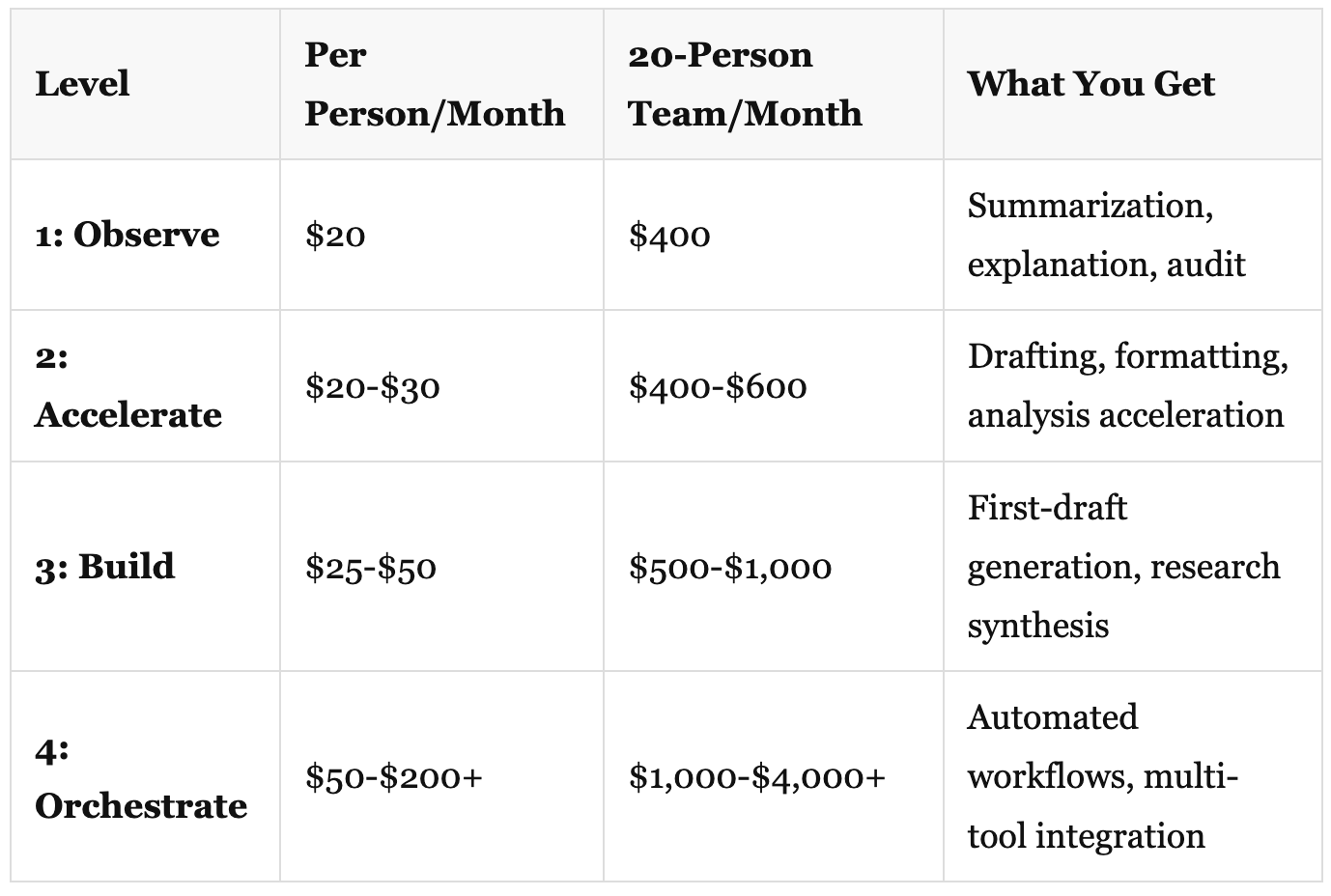
For context: the average company already spends $4,830 per employee per year on SaaS. Level 1-2 AI adoption adds about $240-$360 per employee per year — a 5-7% increase in software spend for a tool that consistently saves 30+ minutes per day.
The more interesting cost question is what it costs to not adopt. If your competitors’ employees are operating at Level 2 and yours are still asking permission to try Level 1, that gap compounds. Not in some abstract future — now. Every week your team spends an hour on work that takes their competitors ten minutes is a week you’re falling behind.
How to Know If It’s Working
You don’t need a dashboard. You need five questions, asked monthly:
How many people are actively using AI tools? (Adoption rate — if you’re paying for 20 accounts and 4 people log in, you have an adoption problem, not an AI problem.)
What tasks are they using it for? (Use case spread — is it expanding beyond early adopters and beyond drafting?)
How much time do they estimate it saves per week? (Self-reported, imperfect, but directional.)
Have they caught errors in AI output? (Error awareness — this is a good signal. People who catch errors are reviewing critically. People who never catch errors are either very lucky or not checking.)
What have they stopped doing because of AI? (This is where real ROI lives. If nobody stopped doing anything, the tool is additive, not transformative. You want displacement — old tasks that no longer need human time.)
Five questions. Two minutes. Monthly. Track the trends. You’ll know within three months whether this is working.
Decide, Ship, Observe, Adjust
The organizations getting value from AI right now are not the ones with the best AI strategy documents. They’re the ones where employees are already using it, leadership has provided clear guardrails, and everyone is learning by doing.
The bias toward action applies here as much as anywhere. You can spend six months building a perfect AI policy, or you can spend ten minutes setting up a paid account, thirty minutes writing a one-page use policy, and start learning today.
Your employees have already decided. The question is whether you’ll give them guardrails or let them figure it out alone.
Delivered results beat perfect plans. Start at Level 1. Build the guardrails as you climb.
This is the first piece in a series on practical AI adoption. Next: the one-page AI use policy template you can implement this week, and a self-assessment tool to map where your organization actually sits on the ladder.
If you’re leading an organization through this — or you’ve already started and have a story worth sharing — I want to hear about it. What’s working? What isn’t? Hit reply.
References
Microsoft 2025 Work Trend Index — 78% BYOAI rate, 52% reluctance to disclose AI use, power users save 30+ minutes daily
Anthropic Claude Pricing — Pro ($20/mo), Team ($25/user/mo), Enterprise (custom)
OpenAI ChatGPT Pricing — Plus ($20/mo), Team ($25/user/mo), Enterprise (custom)
Zylo 2025 SaaS Management Index — Average SaaS spend $4,830 per employee per year, 22% YoY increase
Deloitte 2026 State of AI — Worker AI access up 50% in 2025, 42% feel strategically ready but less prepared in infrastructure
Google AI Essentials — 67% of GenAI users save 2+ hours per week
NIST AI Risk Management Framework — Free risk governance framework for AI adoption
Originally published on Discontinuity